
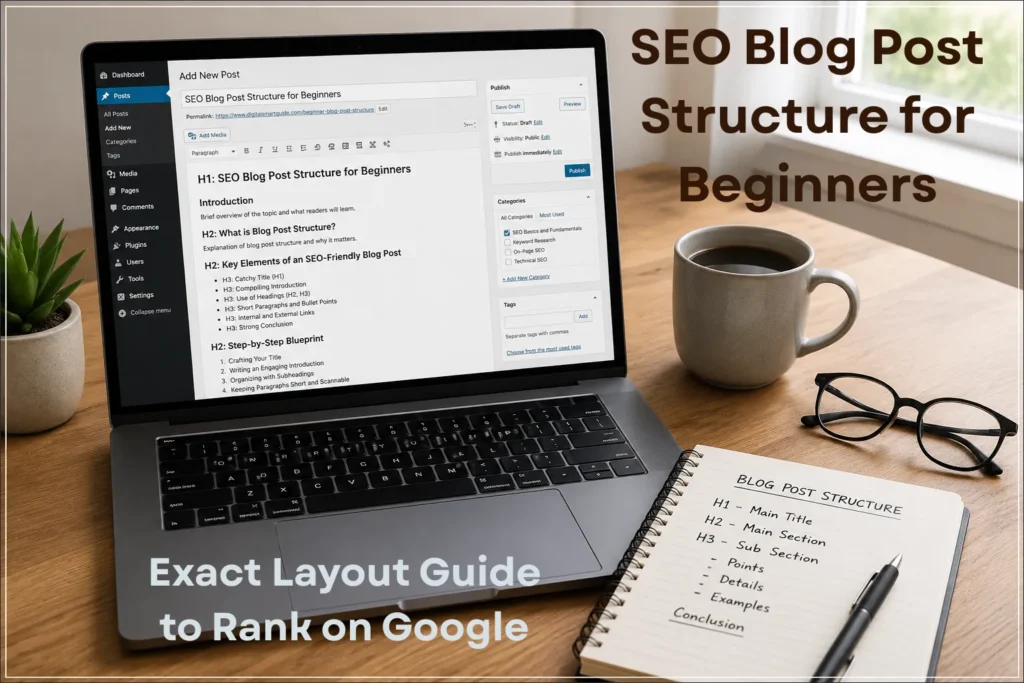
Structuring a blog post for SEO is one of the biggest challenges beginners face. When you first start blogging, publishing an article can feel like tossing a message in a bottle into the vast ocean of the internet. You spend hours brainstorming a topic, writing out your thoughts and hitting the publish button, only to wait weeks without seeing any traffic. Why does this happen? Often, the problem is not your actual writing, but the way your content is organized.
Structuring a beginner-friendly blog post for SEO means organizing your content with clear headings, short paragraphs and targeted keywords so both readers and Google can easily understand it. If your layout is cluttered or confusing, human readers will bounce away within seconds and search engine bots will struggle to parse your value.
In this comprehensive guide, we will break down how to design, format and structure a beginner-friendly blog post that is easier for readers and search engines to understand.
- SEO Blog Post Structure for Beginners: Why It Matters
- What is Blog Post Structure and Why Does It Matter?
- Key Elements of an SEO-Friendly Blog Post Structure
- Comparison Table: Unstructured vs. Structured Blog Posts
- Step-by-Step Blueprint to Formatting Your Content
- Example: Transforming a Post
- Common Mistakes Beginners Make When Formatting Content
- SEO Checklist: Before You Hit Publish
- Frequently Asked Questions (FAQs)
- Conclusion:
SEO Blog Post Structure for Beginners: Why It Matters
If you are new to blogging, it is easy to assume that writing good content is enough to rank on Google. However, even well-written articles can struggle to gain visibility if they are poorly structured. Search engines rely on clear formatting to understand what your content is about, while readers depend on structure to quickly find the information they need.
A properly structured blog post acts like a roadmap. It guides both the reader and search engine crawlers through your content in a logical way. When your headings are organised, your paragraphs are easy to read and your ideas flow smoothly, it becomes much easier for Google to identify your key topics and match them with relevant search queries.
On the other hand, a poorly structured post creates confusion. Readers may leave the page when the content is difficult to scan or navigate. Poor organization can also make it harder for users and search systems to understand the main topics covered. This can prevent your post from ranking, even if the information itself is useful.
For beginners, mastering blog post structure is one of the fastest ways to improve SEO performance without needing advanced tools or technical skills. It helps your content look professional, improves user experience and increases your chances of ranking higher in search results.
What is Blog Post Structure and Why Does It Matter?
Blog post structure refers to the visual and logical arrangement of your text. It includes everything from your main title down to your paragraphs, subheadings, bullet points and links.
When Google crawls your website, it doesn’t read your post the way a human does. It scans your code, looks at your heading tags, and evaluates how easy it is to extract answers from your text. Meanwhile, human visitors skim through your content using their eyes to look for bold text, lists and clear subheadings.
This is why following best practices outlined in Google’s SEO Starter Guide can help you structure your content in a way that is easier for both users and search engines to understand.
What is a well-structured blog post?
A well-structured blog post is content organised with clear headings, short paragraphs and logical flow so both readers and search engines can easily understand and navigate it.
If you ignore structure, you create two major problems:
- High Bounce Rates: Readers get overwhelmed by walls of dense text and leave immediately.
- Crawling and Ranking Friction: Poorly organized content can make the relationships between sections and topics less clear to readers and search systems.

Key Elements of an SEO-Friendly Blog Post Structure
To create content that is easier for readers and search engines to understand, you need to master a few basic elements.
- Interesting Title (H1): Write one main title per page & include your primary keyword near the front.
- Compelling Introduction: State the topic in the first 2-3 sentences and tell the reader what they will learn.
- Logical Heading Hierarchy (H2 and H3): Break your content into sections using H2 tags for main points and H3 tags for sub-points.
- Keep paragraphs short: No more than three to four lines—to make text easier to read on mobile screens.
- Relevant Keywords: Use your main keyword and related terms naturally in the introduction, headings, and conclusion.
- Internal and External Links: Link to other relevant pages on your site (internal) and trusted external sources to build authority.
- Strong Conclusion & Call to Action (CTA): End with the main point and guide the reader on their next step by adding CTA.
To further enhance your content’s visibility in search results, you can also implement structured data using tools like our Free Blog Post Schema Markup Generator Tool for SEO, which helps search engines better understand your page content.
You can also enhance your content’s appearance in search results by adding structured data, and tools like our Free FAQ Schema Markup Generator – Create FAQ JSON-LD Instantly make it easy to implement FAQ schema without coding.
Comparison Table: Unstructured vs. Structured Blog Posts
Look at this comparison chart to see how clean formatting improves user experience and SEO.
| Feature | Unstructured Blog Post | Structured Blog Post |
|---|---|---|
| Paragraph Length | Long, dense blocks of 8–10 lines. | Short, digestible blocks of 2–4 lines. |
| Heading Usage | Only a title; zero subheadings. | Clear hierarchical layout using H2 and H3 tags. |
| Mobile Readability | Extremely difficult to read on smartphones. | Highly scannable and mobile-friendly. |
| Search Engine Appeal | Bots struggle to interpret context and hierarchy. | Clearer structure for readers and search systems. |
Step-by-Step Blueprint to Formatting Your Content
Step 1: Crafting Your Title (H1) and Meta Details
Your H1 tag is the most prominent headline on your page. Make it catchy, clear and ensure it contains your primary target keyword. Alongside your title, you need to optimize your backend Yoast SEO details to ensure your page stands out in search results.
- Focus Keyword: beginner blog post structure
- SEO Title: How to Structure a Blog Post for SEO (Beginner Guide)
- Slug:
beginner-blog-post-structure - Meta Description: Learn how to structure a beginner-friendly blog post for SEO with short paragraphs, clear headings and proven formatting tactics.
Step 2: Writing an Engaging Introduction
Always state your core message right at the beginning instead of hiding it at the end. In your opening 2 to 3 sentences, introduce the core problem your reader is facing and briefly outline what solutions they will discover by reading your guide.
Keeping your text at the right length matters, so you can use our instant Word and Character Counter Tool to check if your post meets SEO and readability guidelines.
Step 3: Organizing with H2 and H3 Subheadings
Break up your text blocks using subheadings. Think of your subheadings as the table of contents for a mini-chapter. If someone only reads your subheadings, they should still be able to understand the flow of your entire article. For technical tips on setting up your layout tags, learn how formatting issues affect SEO in our detailed guide on readability and parsing errors in SEO.
Step 4: Keeping Paragraphs Short and Scannable
On mobile screens, a 5-line paragraph on a desktop can quickly turn into a massive wall of text. Stick to a maximum of 3 to 4 lines per paragraph. Use bullet points and numbered lists to break up long blocks of text and guide your reader’s eyes down the page.
Example: Transforming a Post
Think about a beginner blogger writing a post about how to fix website errors.
- The Old Way (Unstructured): They write a 1,500-word essay with zero subheadings, no bullet points and giant paragraphs explaining what a 404 error is, how to fix it and what plugins to use all mixed together. Readers get confused and exit the page within ten seconds.
- The Structured Way: They divide the post into distinct H2 sections: What is a 404 Error?, How to Find Broken Links Using Google Search Console, and Step-by-Step Fixes. They use bullet points for tool suggestions and short paragraphs.
Because of this, visitors stay on your site longer, and search engines can easily understand and index your main topics. Fix crawling and indexing issues using our guide on Most Common Google Search Console Errors: 404, Discovered and Crawled.
Common Mistakes Beginners Make When Formatting Content
Even with the best design, new content creators often fall into a few common formatting traps:
- Using Multiple H1 Tags: Your page should only have one H1 tag (your main post title). Using multiple H1s confuses search engine bots about your primary topic.
- Skipping Heading Levels: Do not jump straight from an H2 tag down to an H4 tag. Keep a logical hierarchy (H2 followed by H3 sub-points).
- Writing Endless Text Walls: Forgetting to use bold text, bullet points, or lists makes your content look exhausting to read.
- Ignoring Mobile Layouts: Always preview your draft on a mobile device to ensure your paragraphs don’t look overly stretched out.
SEO Checklist: Before You Hit Publish
Before you change your post status from draft to live, run through this quick optimization checklist:
- [ ] Primary Keyword: Included in your H1 title, introduction, and at least one H2 heading.
- [ ] Heading Hierarchy: Checked to ensure all H2 and H3 tags are nested correctly.
- [ ] Paragraph Lengths: Verified that no paragraph exceeds 4 lines of text.
- [ ] Internal Links: Added helpful links pointing to other relevant pages on your site, such as our complete overview on Why Google Indexes Your Page But Doesn’t Rank It.
- [ ] Yoast Optimization: Ensured your slug is short, clean, and your meta description is engaging.
Quick Blog Post Structure Template
H1: Title with keyword
Intro: Problem + solution (3–4 lines)
H2: Main section
H3: Sub-points
Bullet points
Example
Conclusion + CTA
Frequently Asked Questions (FAQs)
1. How many headings should a blog post have?
There is no fixed number of headings required for SEO. Use H2 and H3 headings wherever they make the article easier to understand and navigate. Longer sections may benefit from additional subheadings, but the structure should follow the content rather than an arbitrary word count.
2. Does heading structure directly affect my search engine rankings?
A clear heading structure can help readers and search engines understand how the content is organized. However, headings alone do not guarantee rankings. Google considers many signals when determining which pages appear for a search query.
3. What is the ideal paragraph length for SEO and readability?
Aim for 2 to 3 sentences per paragraph. This keeps the layout airy and prevents mobile users from experiencing reading fatigue.
4. Can I use bullet points inside my introduction?
It is usually best to keep your introduction focused on narrative text to hook the reader, saving bullet points and lists for the body sections where you break down actionable steps.
Conclusion:
Structuring your blog post correctly is the secret bridge between writing good content and actually getting traffic. By combining a catchy H1 title, logical H2 and H3 subheadings, short paragraphs, and strategic internal links, you create an experience that both human readers and search engines love.
Take what you have learned today, review your upcoming drafts and before publishing your next post, review your structure using this checklist—and if your content still isn’t ranking, explore our guide on why Google indexes your page but doesn’t rank it.
Suggested Further Reading
- Most Common Google Search Console Errors (404, Discovered and Crawled)
- Readability & Parsing Errors in SEO (Beginner Guide)
- Comprehensive Guide: Fixing Redirect, Canonical and Duplicate Errors in GSC
- Why Google Indexes Your Page But Doesn’t Rank It (Fixes That Actually Work)
- Keyword Cannibalization: Why Your Pages Compete (And How to Fix It)
- How to Refresh Old Blog Content (That Boosts Traffic Fast)
- Free HowTo Schema Generator Tool – Create How-To JSON-LD Instantly
- The Ideal Guide to Domain, Hosting and WordPress for Beginners
- Technical SEO Secrets: Build a High-Performance Website
- Understanding Google Search Console: Grow Your Website Traffic
- Rich Results Test Guide: How to Validate Schema and Fix All Errors
✍️ About the Author
Digital Smart Guide is dedicated to simplifying SEO and digital marketing for beginners and professionals.
We share practical, easy-to-understand strategies based on real experience and ongoing learning from Google updates.
Disclaimer
This content is for informational purposes only. Results may vary based on your niche, competition, and implementation. Always apply strategies based on your specific needs.