
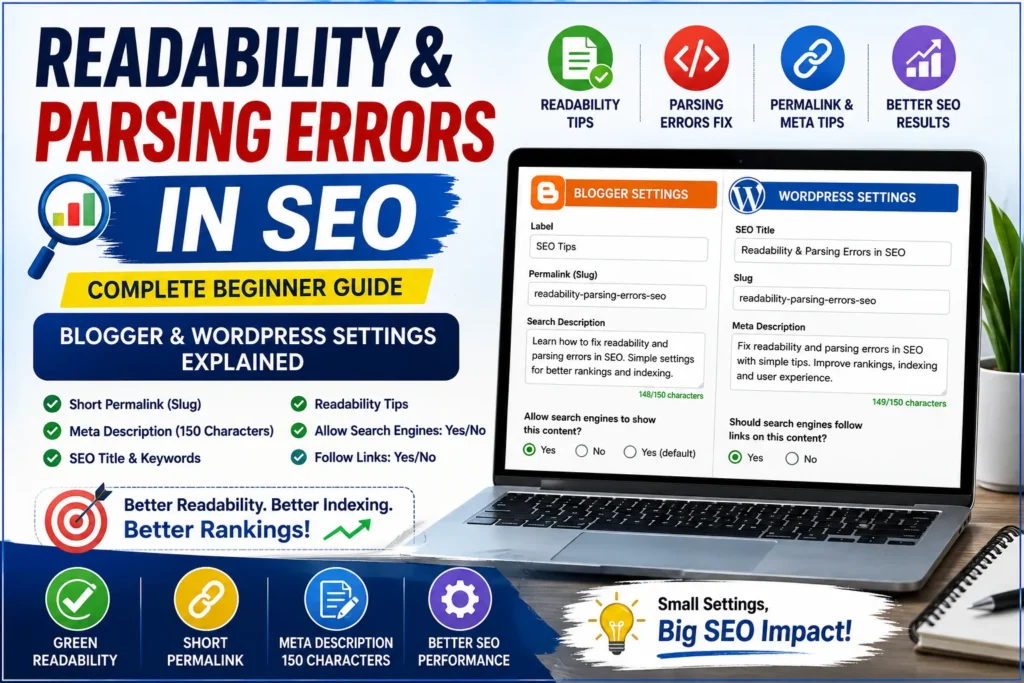
If you are a beginner in SEO, you might feel confused when you see terms like readability issues, parsing errors, meta descriptions, slugs and indexing settings.
Don’t worry — you are not alone.
Google’s latest updates emphasize that content should be written for people first, and these technical readability settings are exactly what makes that possible.
In fact, many new bloggers focus only on writing content but ignore these small settings. Nevertheless, these specific elements ultimately determine whether or not your content achieves a ranking on Google.
In this guide, I will explain everything in simple human language, so you can fix errors easily and feel confident.
- What Are Readability Issues in SEO?
- Why Readability Is Important?
- Yoast Readability Optimization (Important)
- Why Labels (Categories) Are Important in Blogger
- What Are Parsing Errors?
- WordPress Settings Explained (Very Important)
- WordPress Indexing & Linking Settings
- Common Mistakes Beginners Make
- SEO Checklist (Follow This Before Publishing)
- SEO Checklist for New Blog Posts
- Pro Tips for Better SEO
- Frequently Asked Questions (FAQs)
- Conclusion: Turning Errors into Growth
What Are Readability Issues in SEO?
Readability measures how easily and clearly your audience can understand your content.
Search engines like Google prefer content that is:
- Simple
- Clear
- Well-structured
- Easy to scan
Tools such as Yoast SEO check your readability and give warnings.
Why Readability Is Important?
- Improves user experience
- Increases time on page
- Reduces bounce rate
- Helps Google understand content
- Boosts rankings
In short: Better readability = Better SEO
When I started blogging, I ignored readability completely. One of my posts had over 2,000 words but very long paragraphs. After fixing sentence structure and adding transition words, my average time on page increased by 40% within 2 weeks.
Common Readability Problems
1. Consecutive Sentences Issue
This issue arises whenever numerous consecutive sentences begin with identical terminology.
Bad Example:
- Use this tool to generate schema.
- Use the copy button.
- Use the code in your website.
This feels repetitive and boring.
Fixed Example:
- Get started with this tool to generate schema.
- Next, use the copy button to save the code.
- Finally, place the code on your website.
✔ Now it sounds natural and better.
2. Lack of Transition Words
Transition words help your content flow smoothly.
Examples of Transition Words:
- Furthermore
- Additionally
- However
- Therefore
- Consequently
- In fact
Without Transition Words:
“This tool is easy. It generates schema. It improves SEO.”
With Transition Words:
“This tool is easy to use. Furthermore, it generates schema instantly. As a result, it improves your SEO performance.”
✔ Much better readability.

Yoast Readability Optimization (Important)
To get green score in Yoast, follow this:
1. Fix Consecutive Sentences
Instead of repeating:
- Use
- Use
- Use
Add variation:
- Start
- Next
- Finally
2. Add Transition Words
Example:
“SEO is important. It improves ranking.”
Fix:
“SEO is important. Furthermore, it improves ranking.”
3. Break Long Paragraphs
6–7 lines paragraph → Bad
2–3 lines → Good
Simple Real-Life Example
Hard to Read:
“Focusing on search engine optimization allows you to attract a larger audience while ensuring your website remains competitive and easy to navigate.”
Easy Version:
“By optimizing your pages for search engines, you make it easier for new visitors to discover your site and enjoy a better browsing experience.”
✔ Simple always wins.
Why Labels (Categories) Are Important in Blogger
Labels help organize your content.
Benefits of Labels:
- Improves site structure
- Helps users find related posts
- Boosts internal linking
- Supports SEO
Example:
Label: SEO Basics
Posts under it:
- Keyword research
- On-page SEO
- Meta tags
✔ This builds topical authority.
What Are Parsing Errors?
Parsing errors happen when search engines cannot read your code properly.
This mostly occurs in:
- Schema markup
- HTML mistakes
- Broken structured data
Example of Parsing Error
Wrong JSON:
“name”: “Event,✔ Missing closing quote → Error
Correct Version:
“name”: “Event”Why Parsing Errors Matter?
Google ignores your structured data
Rich results won’t appear
SEO performance drops
Always validate your code before publishing.
WordPress Settings Explained (Very Important)
1. Allow Search Engines to Show This Content?
Options:
- Yes
- No
Choose: YES (Default)
Why?
- Allows Google to index your page
- Makes your content visible in search
When to Choose NO?
- Private pages
- Thank you pages
- Admin pages
2. Should Search Engines Follow Links?
Options:
- Yes
- No
Choose: YES
Why?
- Helps Google discover other pages
- Improves crawling
- Boosts internal linking
When to Use NO?
- Sponsored links
- Paid backlinks
- Untrusted sites
3. Internal Linking (Important for SEO)
Always link your related posts.
Example:
If you wrote about GSC errors, write the post tittle and link your Post URL to it. For Example:
Read this our guide on Fix Common Google Search Console Errors
Benefits:
- Improves SEO
- Increases page views
- Helps Google crawl
4. External Linking (Trust Building)
Link to trusted sources.
Example:
- Google documentation
- SEO tools
✔ Builds authority
WordPress Indexing & Linking Settings
To help you quickly compare complex technical settings and understand the immediate impact of your site adjustments, I have organized the following data into simple, at-a-glance references.
| Setting | Recommendation | Why? |
|---|---|---|
| Allow Search Engines | YES | Essential for Google to find and index your site. |
| Follow Links | YES | Improves your site’s authority and helps Google crawl. |
| Private Pages | NO (No-index) | Prevents thin or redundant pages from wasting crawl budget. |
| Sponsored/Paid Links | NO (No-follow) | Protects your site from being flagged for spammy backlinks. |

5. Why Short Permalink (Slug) Is Important
A permalink is your post URL.
Bad URL:
/how-to-fix-google-search-console-errors-step-by-step-guide-for-beginners-2026Good URL:
/gsc-errors-fixBenefits of Short Slug:
- Easy to read
- Better CTR
- SEO friendly
- Easy to share
For example, one of my posts improved from position 18 to position 9 after fixing Yoast readability issues and shortening the slug.
6. Meta Description (150 Characters Rule)
Meta description appears in Google search results.
Best Practices:
- Keep under 150–160 characters
- Include main keyword
- Make it clickable
Example:
“How to solve SEO errors with this beginner friendly guide?.”
7. Keywords & SEO Title Importance
Focus Keyword
Your main keyword should be:
- In title
- In URL
- In first paragraph
- In headings
8. SEO Title
Bad Title:
“Errors Fix Guide”
Good Title:
“Fix Google Search Console Errors (Beginner Guide)”
✔ Clear + Keyword-rich
9. Short Meta Description (Extra Tip)
Sometimes tools ask for very short meta (20–50 characters).
Example:
“Fix GSC errors fast”
✔ Useful for social previews
Common Mistakes Beginners Make
- Writing long paragraphs
- Ignoring meta description
- Using long URLs
- No internal linking
- Not fixing readability issues
- Ignoring Yoast warnings
SEO Checklist (Follow This Before Publishing)
✔ Use focus keyword
✔ Write SEO title
✔ Add meta description
✔ Use short slug
✔ Fix readability issues
✔ Add transition words
✔ Use headings (H2, H3)
✔ Add internal links
✔ Add external links
✔ Check mobile readability
SEO Checklist for New Blog Posts
| SEO Element | Action Required | Goal |
|---|---|---|
| Focus Keyword | Include in Title, URL, and Heading | Help Google match your content to user queries. |
| Slug | Short, clean, and keyword-rich | Improves CTR and makes URLs shareable. |
| Meta Description | 140–160 characters with CTA | Increases click-through rate from search results. |
| Readability | Use transition words & short sentences | Improving readability enhances the user experience and effectively lowers bounce rates. |
| Internal/External Links | Add 1–2 relevant links | Builds topical authority and keeps users on-site. |
Pro Tips for Better SEO
- Write like you speak
- Keep sentences short
- Use bullet points
- Add examples
- Avoid complex words
Frequently Asked Questions (FAQs)
1. What is readability in SEO?
Readability in SEO refers to how easy your content is to read and understand. Simple sentences, short paragraphs, and clear structure improve readability and help both users and search engines.
2. Why is readability important for ranking?
Readability improves user experience. As a result, visitors stay longer on your page, which reduces bounce rate and helps improve your Google rankings.
3. What are parsing errors in SEO?
Parsing errors happen when search engines cannot properly read your code, especially structured data like schema markup. These errors prevent Google from understanding your content correctly.
4. How can I fix readability issues in Yoast SEO?
You can fix readability issues by:
- Using shorter sentences
- Adding transition words like “however” and “therefore”
- Avoiding consecutive sentences starting with the same word
- Breaking long paragraphs into smaller ones
5. Why should I use a short permalink (slug)?
A short permalink is easier to read, improves click-through rate, and helps search engines understand your page topic better.
6. What is the ideal meta description length?
The ideal meta description length is between 140–160 characters. This length provides enough space to naturally incorporate your target keyword while compelling users to click.
7. Should I allow search engines to index my content?
Yes, you should select “Allow search engines to show this content” unless the page is private or not meant for public viewing.
8. Should search engines follow links on my page?
Yes, allowing search engines to follow links helps with crawling and improves SEO by passing link value to other pages.
9. What are and how do labels help improve your blog’s navigation in Blogger?
Labels help organize your blog posts into categories. They improve navigation, internal linking, and overall SEO structure.
10. How do transition words improve SEO content?
Transition words improve the flow of your content. As a result, your content becomes more accessible and helps you secure a higher readability score in Yoast SEO.
Conclusion: Turning Errors into Growth
Ultimately, fixing readability and parsing errors is not difficult once you understand the basics.
Furthermore, small improvements like:
- Adding transition words
- Using short URLs
- Writing clear sentences
can make a huge difference in your rankings.
In fact, most beginners fail not because of lack of knowledge, but because they ignore these small details.
So, focus on clarity, structure and simplicity.
That’s the real secret of SEO success.
Suggested Further Reading
- Most Common Google Search Console Errors (404, Discovered and Crawled)
- Mastering Google Analytics 4: The Essential Strategy for Growth
- How to Link GSC and GA4 for Advanced Data Insights
- Optimize WordPress Robots.txt for SEO (Complete Guide)
- Sitemaps vs. Robots.txt: Which One Controls Your SEO? (Guide)
- Canonical URL Explained: Fix Duplicate Content Issues
- Noindex vs Robots.txt vs Canonical: When to Use What?
- Your Google Business Profile Gets Views but No Sales? 5 Fixes That Turn Views into Real Customers
- Free FAQ Schema Markup Generator – Create FAQ JSON-LD Instantly
- Best Digital Marketing Tools for Small Businesses – Choose Smartly
- Free HowTo Schema Generator Tool – Create How-To JSON-LD Instantly
✍️ About the Author
Digital Smart Guide is dedicated to simplifying SEO and digital marketing for beginners and professionals.
We share practical, easy-to-understand strategies based on real experience and ongoing learning from Google updates.
Disclaimer
This content is for informational purposes only. Results may vary based on your niche, competition, and implementation. Always apply strategies based on your specific needs.