
If you are a blogger or a website owner, you have likely experienced the “indexing frustration.” You spend hours researching keywords, writing a comprehensive article, and hitting the publish button. You wait a few days, check Google Search Console (GSC), and see that beautiful “Page is indexed” message.
If your page is indexed but getting zero impressions, it means Google has seen your content—but decided it’s not worth showing.
But then, you check your traffic. Nothing. You check your performance report. Zero impressions. Zero clicks.
It feels like your page is invisible, even though Google technically “knows” it exists. This is what I call a Silent SEO Killer. It is a common problem, but it is also one that you can fix if you understand how Google’s ranking filters work.
Before diving into ranking strategies, it is important to ensure your site is technically healthy. If you are struggling with foundational indexing issues, I highly recommend reviewing our Understanding Google Search Console and our Comprehensive Guide: Fixing Redirect, Canonical and Duplicate Errors in GSC. These guides will help you resolve the technical roadblocks that often prevent Google from seeing your content in the first place.
In this guide, I will break down why this happens and how you can take your content from “indexed but invisible” to ranking on page one.
By the end of this guide, you’ll know exactly why your page gets zero impressions—and how to fix it step by step.
- The Difference Between Indexing and Ranking
- Four Reasons Your Page Is Indexed But Not Ranking
- Advanced Ranking Filters Google Uses (Why You’re Still Invisible)
- Comparison Table: Indexed vs. Ranking Issues
- The Hard Truth About Google Rankings Most Bloggers Ignore
- Real-World Example: Fixing the Intent Gap
- How to Fix the "Silent SEO Killer"
- SEO Checklist: Before You Publish Again
- Frequently Asked Questions (FAQs)
- Conclusion
The Difference Between Indexing and Ranking
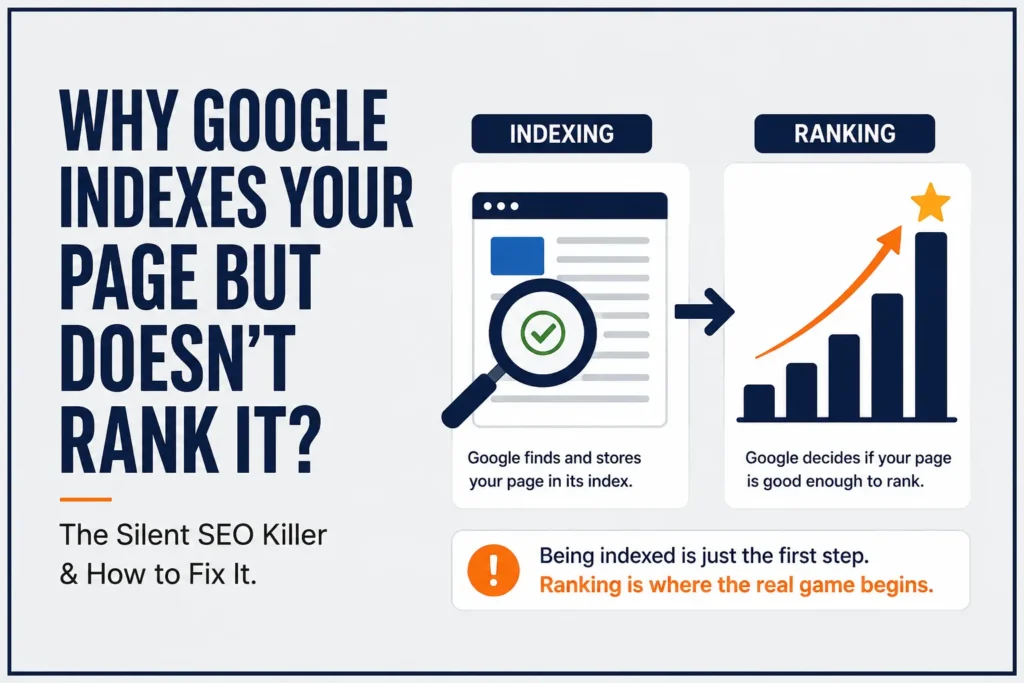
To understand why your page isn’t ranking, you first need to distinguish between two different stages in Google’s process:

- Indexing: This is like Google putting your book on a library shelf. It knows the book is there, and it can find it if someone looks for it by title.
- Ranking: This is Google deciding that your book is actually good enough to be recommended to a reader searching for a specific topic.
Just because a page is on the shelf (indexed) doesn’t mean Google thinks it deserves a top spot (ranking). If your content lacks authority, relevance, or user satisfaction, Google will leave it sitting on the shelf, unread.
Four Reasons Your Page Is Indexed But Not Ranking
There are several reasons why your page is trapped in the “indexed but not ranking” zone. Let’s look at the most common culprits.
1. The Intent Mismatch
Sometimes, we write great content, but we target the wrong intent. If a user searches for “How to fix a pipe” and your page is titled “History of Piping Systems,” you have a mismatch. Even if your page is well-written, Google knows it isn’t what the user is looking for.
2. Lack of Topical Authority
If your website is new, Google might be hesitant to rank you for competitive terms. If you are a plumbing expert but you suddenly write a post about “Digital Marketing SEO,” Google might struggle to trust your authority on that topic.
3. Thin or Low-Quality Content
Google’s latest updates emphasize “people-first” content. If your page is full of filler text, generic advice or copied ideas, it will likely be filtered out of the ranking pool.
4. Poor User Interaction Signals
As we discussed in my previous guide on Google Search Console errors fix guide, Google heavily monitors how users interact with your content. If users click on your page from search results and immediately leave (a high bounce rate), Google takes note.
Beyond just user interaction, how your content is parsed by Google is critical; if you find your pages are difficult to scan or formatted poorly, check out our Readability & Parsing Errors in SEO (Beginner Guide) to learn how proper structure can directly boost your search performance.
Advanced Ranking Filters Google Uses (Why You’re Still Invisible)
Even after fixing intent, content quality and internal links, some pages still refuse to rank. This is because Google applies multiple hidden ranking filters before pushing content to page one.

Understanding these filters can give you a serious edge. If your page is indexed but not ranking, this visual explains exactly why.
1. Query Deserves Freshness (QDF)
Google sometimes prioritizes fresh content over older pages, especially for topics that change frequently.
Example:
If your topic is:
- SEO strategies
- Google updates
- AI tools
Then Google may prefer recently updated pages, even if older content is more detailed.
Fix:
- Add “Last Updated” date
- Refresh content every 2–3 months
- Include recent examples or trends
This signals your content is still relevant.
2. Content Depth vs. Content Clarity
Many bloggers think longer content = better rankings.
But Google actually prefers clear, structured, and useful content.
A 2,000-word article filled with fluff can lose to a 900-word highly focused page.
What Google Looks For:
- Does the page answer the question quickly?
- Is it easy to scan?
- Are headings meaningful?
Fix:
- Add clear H2/H3 structure
- Use short paragraphs (2–3 lines)
- Include summaries or key takeaways
To help search engines properly parse and understand your structural hierarchy, you can quickly build structured data using our free Blog Post Schema Markup Generator to enhance your page’s presentation in search results.
3. First Page Competition Barrier
Sometimes your content is good—but your competitors are simply too strong.
If the first page has:
- High authority domains
- Strong backlinks
- Established topical authority
Then Google may keep your page in a “testing phase”.
Fix:
- Target long-tail variations
- Example:
- Instead of: page indexed but not ranking
- Use: why indexed pages get zero impressions in Google
This helps you enter rankings through less competitive entry points
4. Lack of Click Appeal (Hidden CTR Problem)
Even if your page appears in search results, users may not click it.
Google notices this.
Low CTR = low ranking potential
Signs:
- Impressions increasing
- Clicks staying at zero
Fix:
Improve your:
Title
Instead of:
Page Indexed But Not Ranking
Use:
Page Indexed But Not Ranking? 7 Fixes That Actually Work
Meta Description
Make it benefit-driven:
Discover why your indexed page gets zero traffic and fix it with proven SEO strategies.
5. Sandbox Effect (Especially for New Sites)
Brand-new domains typically experience a temporary testing period often called the Google sandbox.
This means:
- Your content gets indexed
- But rankings are delayed
Google does this to:
1. Verify trust
2. Prevent spam
Fix:
- Stay consistent with publishing
- Build internal links
- Get a few natural backlinks
Rankings usually improve over time
6. Weak Topical Clustering
A single article is rarely enough to rank anymore.
Google prefers content ecosystems.
Weak Approach:
1 article about SEO
Strong Approach:
- Main article (pillar post)
- Supporting posts:
- Internal linking guide
- CTR optimization
- Content quality checklist
Fix:
Create topic clusters
Example for your niche:
- Indexed but not ranking (main post)
- Fix crawled not indexed
- Improve CTR
- Internal linking strategy
Then interlink all of them
Comparison Table: Indexed vs. Ranking Issues

| Issue | How to Spot It | Primary Fix |
|---|---|---|
| Intent Mismatch | High impressions, very low CTR | Rewrite Title & H1 tags |
| Thin Content | No impressions, not appearing in GSC | Add data, examples and depth |
| Technical Errors | Page indexed but ‘Crawled – currently not indexed’ | Check internal linking structure |
The Hard Truth About Google Rankings Most Bloggers Ignore
Many bloggers assume that if a page doesn’t rank within a few days, something is wrong.
But in reality, Google often takes time to:
- Test your content
- Compare it with competitors
- Analyze user behavior
This is called the ranking delay phase.
During this period:
- Your page may get little to no impressions
- Rankings may fluctuate
- Visibility may seem inconsistent
What You Should Do Instead:
- Avoid constant rewriting
- Let the page “settle” for 2–4 weeks
- Monitor impressions in Search Console
If your site’s visibility is steadily growing, you are moving in the right direction.
Final Insight (Powerful Closing Add-on)
Ranking is not just about being good —
it’s about being better than what already exists.
If your page is indexed but not ranking, it means:
1. Google sees you
2. But doesn’t trust you enough yet
Your job is to:
- Align with intent
- Improve clarity
- Strengthen authority
- Increase engagement
Keep up this steady approach, and your content will gradually transition from:
Invisible → Tested → Ranked → Top Positions
Real-World Example: Fixing the Intent Gap
I once worked with a client who had a fantastic technical guide about “Piping Line Numbering.” The content was perfect, but it wasn’t ranking. After analyzing the search intent, we realized the searchers were actually looking for “Line Numbering Standards” rather than just a general guide.
The Fix: We updated the headings to align with common industry queries and added a section specifically addressing the ISO standards. In just a fortnight, the page went from having no traffic at all to ranking in the top 20, eventually reaching the first page of search results.
Remember: Ranking is not about publishing more content—it’s about publishing content that deserves to rank.
If you’ve faced this issue, comment below—what’s your biggest struggle with SEO right now?
How to Fix the “Silent SEO Killer”
Should your web page appear in the index yet fail to generate search visibility, execute the following steps to diagnose and resolve the problem.
Step 1: Audit Your Search Intent
Go to Google and search for your keyword. Look at the top three results. Are they listicles? How-to guides? Product pages? If your page format doesn’t match what is currently ranking, you need to change your structure.
Step 2: Beef Up Your Content
Don’t just write more words; write better words. Add original images, personal examples, or expert tables that provide value.
Beyond improving your text and structure, ensuring your code is clean and interactive is vital; if you want to automatically generate code for your rich results, try out our free FAQ Schema Generator Tool to add proper markup effortlessly.
Step 3: Check Internal Linking
If a page is important, it should be linked to from your site’s most popular posts. If no other pages on your site link to this new post, Google’s bots may find it harder to assess its importance.
Step 4: Monitor Your Performance
Use the “Performance” tab in Google Search Console to see if the page is appearing for any keywords at all. If it appears for zero keywords, your content likely lacks a clear topic.
SEO Checklist: Before You Publish Again
| SEO Element | Purpose | Goal |
|---|---|---|
| Keyword Research | Match user demand | Find what people are actually searching for |
| Search Intent | Align format with results | Ensure you give the user what they expect |
| Internal Links | Pass authority to the page | Link from your existing high-traffic posts |
| Formatting | Improve readability | Use H2, H3, and bullet points |
If you are looking for more ways to streamline your technical optimizations and speed up your workflow, explore our complete suite of utilities over at the DSG Free SEO Tools hub.
Frequently Asked Questions (FAQs)
1. If a page is indexed, does that guarantee it will eventually rank?
Not necessarily. Indexing only means Google has found your page and saved it in its library. To rank, your content must also satisfy user intent and demonstrate sufficient quality compared to other competing pages.
2. What is the “silent” reason my page shows zero impressions?
Often, this happens because the page has not been identified as a relevant answer for any specific search query. This usually indicates that your keyword usage is too vague or the content lacks the depth required to be considered an authority.
3. Does updating old, non-ranking content actually help?
Yes, it is highly recommended. Rather than deleting pages, you can refresh them by updating headings, adding new data, or improving the clarity to better match what users are currently searching for.
4. How do I know if my page has an “Intent Mismatch”?
You can spot this if your page is indexed but you notice a high number of impressions with a very low click-through rate (CTR). This suggests that users are seeing your link in search results but deciding it isn’t what they want.
5. Is internal linking important for pages that are already indexed?
Absolutely. Internal linking helps Google understand that a page is a priority within your site’s structure, which can help pass “authority” from your high-traffic posts to your newer, non-ranking content.
6. Can slow loading speeds or other technical problems prevent a page from ranking?
Yes, technical factors play a role. If your website is difficult to navigate, slow to load, or not optimized for mobile users, Google may rank your page lower even if the written content is high quality.
7. Why does Google Search Console show my page is “Crawled – currently not indexed”?
This is different from being indexed. It means Google found the page but decided not to add it to the index yet, often due to technical issues, low content quality, or a lack of strong internal links pointing to that page.
Conclusion
Getting indexed is just the starting line. Ranking is the race itself. If your page is indexed but not ranking, don’t panic. It means your page is technically sound, but it needs a little more “human” touch or better alignment with what users are searching for.
Remember, SEO is a marathon. Keep testing, keep refining and keep linking your internal content—like my previous guide on managing technical Google Search Console errors—to build a stronger, more authoritative site.
Focus on clarity, structure, and providing real value. That is the true secret to moving from the shadows of the search index to the top of the page.
If your page is indexed but not ranking, you’re closer than you think. Most pages fail before indexing—you’ve already crossed that stage. Now it’s about optimization, not discovery.
Suggested Further Reading
- Comprehensive Guide: Fixing Redirect, Canonical and Duplicate Errors in GSC
- Most Common Google Search Console Errors (404, Discovered and Crawled)
- How to Structure a Blog Post for SEO: Beginner-Friendly Guide
- Readability & Parsing Errors in SEO (Beginner Guide)
- Optimize WordPress Robots.txt for SEO (Complete Guide)
- Sitemaps vs. Robots.txt: Which One Controls Your SEO? (Guide)
- Canonical URL Explained: Fix Duplicate Content Issues
- SEO Mistakes to Avoid for New Websites (Beginner Guide)
- The Ideal Guide to Domain, Hosting and WordPress for Beginners
- Rich Results Test Guide: How to Validate Schema and Fix All Errors
✍️ About the Author
Digital Smart Guide is dedicated to simplifying SEO and digital marketing for beginners and professionals.
We share practical, easy-to-understand strategies based on real experience and ongoing learning from Google updates.
Disclaimer
This content is for informational purposes only. Results may vary based on your niche, competition, and implementation. Always apply strategies based on your specific needs.