
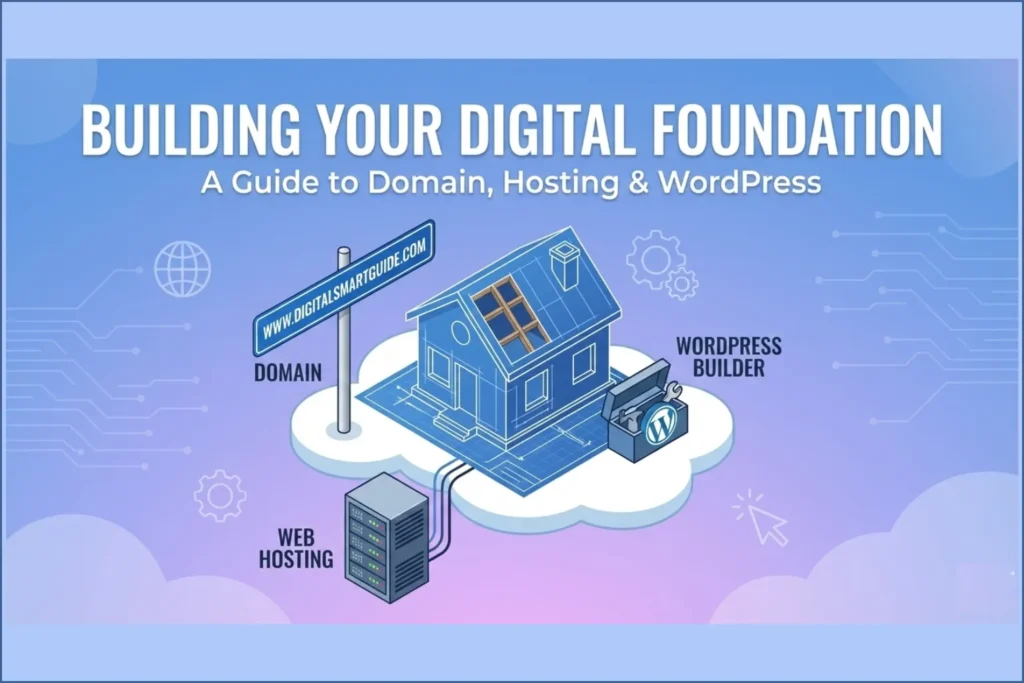
Today having a website is no longer a luxury; it’s a necessity. Whether you are a business owner, a freelancer or a hobbyist, your website is your digital identity. But for many beginners, the technical jargon—Domain, Hosting, WordPress—can feel like a maze.
If you’ve been following our journey here at digitalsmartguide.com, you know we believe in making technology accessible. In this guide, we will break down exactly how these three components work together to bring your website to life.
This guide is based on real-world WordPress experience and best practices used by beginners and professionals alike.
Understanding Domain Names: Your Digital Address
Think of the internet as a massive city. If you want people to visit your house, you need an address. A Domain Name is exactly that—the unique address of your website on the internet (e.g., www.yourname.com).
What is a Domain?
Technically, every computer on the internet has an IP address (a string of numbers like 192.168.1.1). Because humans aren’t great at remembering numbers, we use Domain Names as a friendly layer. When someone types your domain into a browser, the DNS (Domain Name System) translates it back into the IP address of your server.
Types of Domain Extensions (TLDs)
Not all domains end in .com. These endings are called Top-Level Domains (TLDs). Based on your notes, here is how they are categorized:
- gTLDs (Generic Top-Level Domains): These are the most common. Examples include
.com(Commercial),.org(Organization), and.net(Network). - ccTLDs (Country Code Top-Level Domains): These are specific to a country. For example,
.infor India,.usfor the USA, or.ukfor the United Kingdom. - sTLDs (Sponsored Top-Level Domains): These are restricted to specific entities, like
.edufor educational institutions or.govfor government bodies.
Smart Tip: When choosing a name, keep it simple, easy to remember and related to your topic. If you are also focusing on local reach, check out our guide on On-Page SEO Techniques to learn how to optimize your content with location-based keywords to boost your local visibility!
Top Domain Providers
To get a domain, you need to register it with a “Registrar.” Some of the best providers include:
- GoDaddy
- BigRock
- Namecheap
- Hostinger

Domain vs. Hosting vs. WordPress: Quick Comparison
| Component | What It Is | Example | Purpose |
|---|---|---|---|
| Domain Name | Your website’s address | www.yoursite.com | Helps users find your site online |
| Web Hosting | Server space for files | Hostinger / Bluehost | Keeps your website live 24/7 |
| WordPress | Content Management System (CMS) | WordPress.org | Used to build and manage your site |
In simple terms: Domain = Address, Hosting = Storage, WordPress = Website builder.
Web Hosting Infrastructure & Server-Side Execution Mechanics
While a domain acts as your digital locator, web hosting determines your server-side performance, execution speeds, and crawler response rates. Search engines prioritize websites hosted on reliable infrastructure capable of maintaining low Time to First Byte (TTFB) metrics.
1. Server Hardware Architectures: NVMe/SSD vs. Traditional HDDs
The underlying data storage medium directly governs file read/write speeds during server-side script execution (PHP processing):
- NVMe and Solid State Drives (SSDs): Utilize flash-memory microchips with parallel data pathways, providing microsecond input/output operations per second (IOPS). This eliminates database query bottlenecks when WordPress compiles dynamic PHP templates.
- Traditional Mechanical Hard Drives (HDDs): Rely on spinning magnetic disks and physical read/write heads. High latency and slow seek times often result in crawler timeouts and delayed DOM rendering during Googlebot fetches.
2. Server Bandwidth, Data Transfer and Throughput Dynamics
Bandwidth governs the maximum volume of data transmitted between your server and client browsers over a given timeframe. Insufficient bandwidth allocation under high traffic spikes leads to 503 Service Unavailable errors, halting Googlebot’s crawling sequence and triggering indexation drops.
Choosing the Right Type of Hosting
Not all hosting is created equal. Your choice depends on your budget and how much traffic you expect.

| Hosting Architecture | Server Resource Isolation | Average TTFB & Crawl Efficiency | Optimal Traffic Threshold |
|---|---|---|---|
| Shared Hosting | Pooled CPU, RAM, and disk space across hundreds of accounts. | Moderate (300ms – 600ms+) | Up to 10,000 monthly visits. |
| Virtual Private Server (VPS) | Virtualized dedicated partitions with guaranteed CPU and RAM slices. | High (100ms – 250ms) | 10,000 to 100,000+ visits. |
| Dedicated / Cloud Server | Exclusive physical hardware or scalable cloud cluster nodes. | Ultra-Fast (< 100ms) | Enterprise scale and high-volume e-commerce. |
3. DNS Propagation and Nameserver Resolution Protocols
When you decouple your domain registrar from your web host, domain name resolution relies on global DNS propagation loops. Updating your nameservers (NS records) or A Records forces recursive resolvers across global ISPs to update their cache tables. Until propagation finishes (typically 2 to 24 hours), Googlebot fetch requests may encounter intermittent DNS_PROBE_FINISHED_NXDOMAIN errors, resulting in temporary indexation blocks.
4. Related Technical Infrastructure Guides
To ensure your hosting environment and server parameters are fully optimized for search engine crawlers, cross-reference these detailed guides:
- Technical SEO Performance Guide – Comprehensive breakdown of server response headers, caching layers, and Core Web Vitals optimization.
- SEO Mistakes for New Websites – Avoid indexing traps, crawler blocks, and technical setup errors on fresh domains.
Why WordPress is the King of Website Creation
You have your address (Domain) and your land (Hosting). Now you need to build the house. While there are many platforms like Wix, Shopify or Blogger, WordPress is the undisputed leader, powering over 40% of the web.
Benefits of WordPress:
- It’s Free: The software itself costs nothing.
- Easy to Use: You don’t need to be a coder. It’s “What You See Is What You Get.”
- SEO Friendly: Google loves WordPress sites because they are structured well.
- Plugins & Themes: You can change the entire look of your site with one click using a “Theme” or add features (like a contact form) using a “Plugin.”
10 Steps to Create Your WordPress Website
Ready to get started? Follow this checklist from our notes to launch your site:
- Choose Your Topic: What is your website about? (Technology, Cooking, Travel?)
- Pick a Domain Name: Make it catchy!
- Register Domain & Buy Hosting: We recommend starting with a Shared Hosting plan.
- Connect Domain to Hosting: Update your “Nameservers” if you bought them from different places.
- Install WordPress: Most hosts offer a “1-Click Install” via the control panel.
- Login to Dashboard: Access your site at
yourdomain.com/wp-admin. - Choose a Theme: Select a design that matches your brand.
- Install Essential Plugins: Add tools for security, SEO and speed.
- Create Key Pages: Build your “Home,” “About Us,” and “Contact” pages.
- Start Posting: Write your first blog post and share it with the world!
Expanding Your Digital Reach
Building a website is just the beginning. To truly succeed, you need to think about content and tools.
Writing Your First Post
When you sit down to write, remember the 7 Steps of Blogging from our notes: Research your topic, create an outline, write a catchy title and use headings to make it readable. If you feel stuck, you can even use AI Tools for Content Creation to help brainstorm ideas.
The Role of AI
Use AI responsibly to assist, not replace, original thinking. Using modern AI platforms like ElevenLabs for voiceovers or Predis.ai for social media content can save you hours of work. Integrating these tools into your WordPress workflow is the “Smart” way to manage your site.
Pro Tips for the Ultimate WordPress Guide
- The “Search Console” Connection Before you even apply for AdSense, connect your site to Google Search Console. Google likes to see that a site owner is actively monitoring their “crawling” and “indexing” status. It proves you are a serious webmaster.
- Optimize Your Permalinks The first thing you should do after installing WordPress is go to Settings > Permalinks and select “Post Name.” This changes your URL from
mysite.com/?p=123tomysite.com/ultimate-guide-wordpress. This is much better for SEO and AdSense. - Use a Lightweight Theme For AdSense approval, speed is king. Use a fast, clean theme like Astra, GeneratePress or Hello Elementor. Avoid “heavy” themes with too many built-in animations, as they can slow your site down and lead to a “Low Value Content” rejection.
- Delete “Hello World” and Sample Pages Google reviewers hate seeing default content. Before applying, delete the default “Hello World” post and the “Sample Page” that comes with every new WordPress install.
- The “Above the Fold” Rule When you eventually place ads, ensure your main content (the title and first paragraph) is visible immediately when the page loads. If a user has to scroll past three ads just to read your intro, Google may penalize your “User Experience.”
Frequently Asked Questions (FAQ)
1. Can I change my domain name later if I don’t like it?
Technically, you cannot “edit” a domain name once registered. You would have to buy a new one and redirect the old one to the new one. This is why we recommend choosing a name carefully using our “Simple and Catchy” rule!
2. Do I need to buy a separate SSL certificate?
In 2026, most top hosting providers (like Hostinger or Bluehost) include a Free SSL certificate. Always check for this before buying, as “HTTPS” is a mandatory ranking factor for Google and a requirement for AdSense.
3. Is there a difference between WordPress.com and WordPress.org?
Yes! WordPress.org (which we recommend) is self-hosted, meaning you have full ownership and can monetize with AdSense. WordPress.com is a hosted service that has strict limitations on ads and plugins unless you pay for their expensive business plans.
4. How much does it really cost to start a WordPress site?
On average, you can start for about $50–$100 per year. This usually covers a domain (~$12/year) and a basic shared hosting plan (~$3–$7/month). The WordPress software itself is 100% free.
5. How long does it take for a new domain to show up on Google?
It usually takes 48 to 72 hours for a new site to be “indexed.” To speed this up, you should submit your sitemap to Google Search Console immediately after launching.
Conclusion
A website is the heart of your digital presence. By understanding that the Domain is your address, Hosting is your space, and WordPress is your building tool, you are already ahead of 90% of beginners.
The digital world moves fast, but with the right foundation, your website can grow from a small blog into a massive platform.
If you’re just starting, bookmark this guide and build step by step — a strong foundation always wins.
if you think about switching platforms, from Blogger to WordPress make sure to follow this detailed Blogger to WordPress migration checklist to avoid losing your hard-earned rankings.
Suggested Further Reading
- Free Word and Character Counter Tool
- Top SEO Mistakes New Websites Make
- How Google Ranks Websites: The SEO Algorithm Explained
- The Ultimate Guide to Image SEO
- Free Blog Post Schema Markup Generator Tool
- Use On-Page SEO Techniques to Boost Rankings Fast
- Complete Guide to Google Business Profile and Local SEO Growth
- Local SEO Citations: The Ultimate Guide to NAP Consistency
- Backlinks Explained: Complete Beginner to Advanced SEO Guide (With Real Examples)
- Why Fake Reviews Fail: Build Bulletproof Google Review Strategy
- Blogger to WordPress Migration: What Changes, Breaks & What to Check
✍️ About the Author
Digital Smart Guide is dedicated to simplifying SEO and digital marketing for beginners and professionals.
We share practical, easy-to-understand strategies based on real experience and ongoing learning from Google updates.
Disclaimer
This content is for informational purposes only. Results may vary based on your niche, competition, and implementation. Always apply strategies based on your specific needs.