The “Traffic Looks Good, but the Phone Isn’t Ringing” Problem
Your Google Business Profile official page is often the first thing customers see when searching for your business.
Many business owners feel stuck in this exact situation:
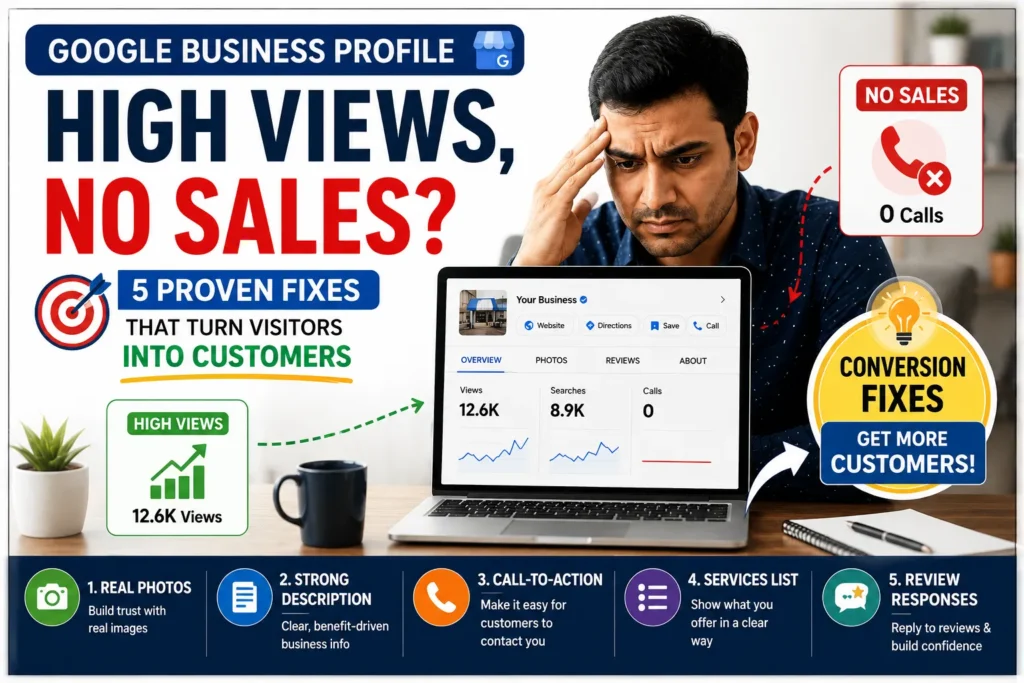
You open your Google Business Profile dashboard and see:
- Thousands of views
- High impressions
- Profile visibility increasing
But when you check actual results:
- No calls
- No website clicks
- No direction requests
This creates confusion and frustration.
Because logically, more views should mean more customers.
But in reality, visibility without conversion is useless.
If your Google Business Profile is attracting attention but not generating leads, the issue is not traffic.
The issue is conversion.
And the good news is — this is fixable.
If you’re struggling to get results, optimizing your Google presence is key. Check out our complete guide on Google Business Profile tips for small businesses to improve your visibility and conversions
- Why Your GBP Gets Views but No Calls
- Why Views Don’t Always Turn Into Customers
- Quick Fix Summary Table (Turn Views into Sales Faster)
- 1. Rewrite Your Business Description for Benefits
- 2. Use Q&A Section to Handle Buying Objections
- 3. Track “Actions” Instead of Just Views
- 4. Provide Real Photos That Build Trust Instantly
- 5. Make Your Profile Feel Active and Updated
- 5 Quick Fixes to Turn Profile Views into Real Leads
- Bonus Strategy: Match Your Content with Local Intent
- Simple Conversion Checklist for Your Google Listing
- Common Mistakes That Kill Conversions
- Frequently Asked Questions (FAQs)
- Conclusion
Why Your GBP Gets Views but No Calls
Getting views on your Google Business Profile is a good sign — it means people are finding you. But if those views are not turning into calls or leads, something is missing in your conversion setup.
Most businesses focus only on online presence, not on action. A user might see your listing, scroll through it and leave without contacting you simply because nothing pushed them to take the next step.
Here are the most common reasons:
- Your business description is too generic and does not highlight what makes you different
- Your photos look like stock images instead of real, trustworthy visuals
- There is no clear reason for the user to contact you right now
- Important details like services, pricing or response time are missing
- Your listing does not build enough trust at first glance
Think of your profile like a landing page. If it does not clearly answer “Why should I choose you?”, users will move on to the next option.
Why Views Don’t Always Turn Into Customers

Before fixing the problem, you need to understand what’s happening.
When someone finds your business on Google, they decide within seconds:
“Should I contact this business or move to the next one?”
This decision is based on:
- Clarity
- Trust
- Relevance
- Confidence
If your profile does not communicate these clearly, people leave — even if you appear in search results.
So your goal is simple:
Turn passive viewers into active buyers.
If you want to master the art of ranking higher in map searches and attracting more local leads, check out our comprehensive guide on Google Business Profile and Local SEO Growth.
Quick Fix Summary Table (Turn Views into Sales Faster)
Here’s a quick comparison to understand the problem and solution:
| Problem Area | What’s Happening | Fix You Should Apply | Expected Result |
|---|---|---|---|
| Weak Business Description | Visitors don’t understand what you offer them | Write a clear, benefit-driven description | Getting more inquiries & calls |
| Poor Quality Images | Profile looks untrustworthy | Upload real, high-quality photos | Higher trust & engagement |
| No Reviews or Low Ratings | People hesitate to choose you | Actively collect and respond to reviews | Better credibility & conversions |
| No Clear Call-to-Action | Users don’t know what to do next | Add “Call Now”, “Book Now”, or WhatsApp link | Increased direct leads |
| Incomplete Profile | Missing details reduce ranking & trust | Fill all sections (services, hours, FAQs) | Better visibility + more conversions |
1. Rewrite Your Business Description for Benefits
Most businesses make a critical mistake.
They write descriptions like this:
“Our team provides reliable plumbing solutions across Mumbai, covering pipe repair, drainage maintenance, and installation services.”
This is informative — but not persuasive.
Now compare it with this:
“Need a reliable plumber in Mumbai? We fix leaks fast, offer same-day service, and ensure clean, hassle-free work—so your home runs smoothly without stress.”
See the difference?
The second version:
- Speaks directly to the customer
- Highlights benefits
- Reduces uncertainty
What You Should Do:
- Focus on customer problems and solutions
- Use simple, conversational language
- Add 1–2 trust signals (experience, speed, reliability)
Your description should answer:
“Why should I choose you right now?”
2. Use Q&A Section to Handle Buying Objections
Most businesses ignore the Q&A section.
This is a big mistake.
Because potential customers often have doubts like:
- What are your charges?
- Do you offer emergency service?
- How fast can you reach?
If these questions are unanswered, users leave.
Smart Strategy:
You can add your own questions and answer them.
Example:
Q: What is the cost of plumbing services?
A: Pricing depends on the issue, but basic inspections start at ₹XXX. We provide transparent pricing with no hidden charges.
Q: Do you offer same-day service in Andheri?
A: Yes, we provide same-day service across Andheri and nearby areas based on availability.
Why This Works:
- Removes hesitation
- Builds trust
- Improves conversion rate
Think of Q&A as your sales assistant.
A well-optimized profile can significantly increase conversions. You can also explore more tools and strategies in this detailed guide on best tools for improving your business exposure.
3. Track “Actions” Instead of Just Views
Many business owners focus on the wrong metric.
They celebrate:
- Views
- Impressions
But ignore the most important data:
- Calls
- Website clicks
- Direction requests
These are called “Actions”.
Why Actions Matter:
Views = Visibility
Actions = Business growth
If your views are high but actions are low, it means:
Your profile is not convincing enough.
What You Should Do:
- Check your GBP insights regularly
- Monitor trends weekly
- Identify which changes increase actions
Your goal is not traffic — it’s conversion.
4. Provide Real Photos That Build Trust Instantly
Stock images or generic photos reduce trust.
People want to see:
- Real work
- Real environment
- Real results
Add These Types of Photos:
- Before/after project images
- Team at work
- Equipment or setup
- Completed service visuals
Example:
Instead of:
“Plumbing service image”
Show:
“Leak repair completed in Borivali kitchen”
Why This Works:
- Builds credibility
- Shows proof of work
- Increases user confidence
People trust what they can see.
5. Make Your Profile Feel Active and Updated
An inactive profile looks unreliable.
If your last update was months ago, users assume:
“This business may not be active.”
Use Google Posts Regularly:
Post updates like:
- Completed projects
- Customer experiences
- Service updates
- Area-specific work
Example:
“Completed AC servicing in Andheri West today. The system had heavy dust buildup due to ongoing construction nearby.”
Benefits:
- Shows activity
- Improves engagement
- Sends freshness signals to Google
Active profiles convert better.
5 Quick Fixes to Turn Profile Views into Real Leads

If your listing is already getting traffic, you do not need more visibility — you need better conversion.
Start with these simple but powerful fixes:
1. Use Real Photos, Not Stock Images
Upload actual photos of your business, team, and work. Real images build instant trust and make your listing feel authentic.
2. Rewrite Your Business Description
Clearly explain:
- What you do
- Who you help
- Why you are different
Avoid generic lines and focus on real value.
3. Add a Strong Call-to-Action
Tell users exactly what to do next:
- “Call now for a free quote”
- “Message us for quick response”
4. Highlight Key Services Clearly
List your main services in a simple, scannable format so users quickly understand what you offer.
5. Respond to Reviews Actively
Replying to reviews shows that your business is active and trustworthy, which increases the chances of getting inquiries.
These small improvements can significantly increase your conversion rate without needing more traffic.
Bonus Strategy: Match Your Content with Local Intent
If your audience is searching for:
- “Plumber in Borivali”
- “Electrician in Andheri”
Your profile should reflect those areas naturally.
How to Do This:
- Mention locations in posts
- Add area-based reviews
- Use local references
This builds relevance and improves conversions.
The Real Shift: From Visibility to Conversion
Most businesses focus only on:
“How do I get more views?”
But the real question should be:
“How do I turn views into customers?”
Once you shift your focus:
- Your profile becomes more persuasive
- Your messaging improves
- Your results increase
Simple Conversion Checklist for Your Google Listing
Before you expect results, make sure your profile is fully optimized for conversions.
Use this quick checklist:
- Profile is 100% complete
- Business description is clear and benefit-driven
- Real images are uploaded (no stock photos)
- Services are listed properly
- Call-to-action is visible and strong
- Reviews are recent and responded to
- Contact details are accurate and easy to access
If you can check all of the above, your listing is no longer just visible — it is ready to convert visitors into real customers.
Common Mistakes That Kill Conversions
Avoid these:
- Writing generic descriptions
- Ignoring Q&A
- Using stock images
- Not updating profile
- Tracking only impressions
These silently reduce your leads.
How Long Does It Take to See Results?
If you apply these changes:
- 1–2 weeks → Improved engagement
- 3–4 weeks → Increase in calls
- 1–2 months → Noticeable growth in leads
Consistency is key.
Related Posts (Recommended Reading)
Frequently Asked Questions (FAQs)
1. Why do I get views but no calls?
Because your profile is visible but not convincing enough to convert users.
2. What is the most important factor for conversion?
Clear messaging, trust signals, and active profile updates.
3. Does Google Business Profile directly affect leads?
Yes, it plays a major role in local discovery and customer decisions.
4. How often should I update my profile?
At least once or twice a week for best results.
5. Can small changes really increase calls?
Yes, even small improvements in messaging and trust can significantly impact conversions.
Conclusion
Getting views on your Google Business Profile is only the first step.
What truly matters is:
Turning those views into real customers.
If you focus on:
- Clear communication
- Trust-building elements
- Active engagement
You will start seeing real results.
Remember:
Want better results? Start optimizing your profile today.
1. Traffic is vanity
2. Conversions are reality
If you’re not getting calls yet, it’s time to fix your strategy step-by-step.
Don’t have a profile yet? create your Google Business Profile and start turning views into real customers.
Suggested Further Reading
- Free HowTo Schema Generator Tool – Create How-To JSON-LD Instantly
- Free Event Schema Generator Tool – Add Event JSON-LD for Google Rich Results
- Free Product Schema Generator Tool – (JSON-LD): Instantly Create Markup
- Rich Results Test Guide: How to Validate Schema and Fix All Errors
- SEO Basics: What You Must Know to Improve Your Rankings
- Backlinks Explained: Complete Beginner to Advanced SEO Guide (With Real Examples)
- Off-Page SEO Guide: Strategies to Build Authority
- Mastering Off-Page SEO: The Authority Guide
- Technical SEO Secrets: Build a High-Performance Website
- How to Link GSC and GA4 for Advanced Data Insights
- Understanding Google Search Console: Grow Your Website Traffic
✍️ About the Author
Digital Smart Guide is dedicated to simplifying SEO and digital marketing for beginners and professionals.
We share practical, easy-to-understand strategies based on real experience and ongoing learning from Google updates.
Disclaimer
This content is for informational purposes only. Results may vary based on your niche, competition, and implementation. Always apply strategies based on your specific needs.